Self-hosted · no telemetry · no phone-home
Capture the web. Own your copy.
As plain Markdown, on your disk.
Khiip captures X, Reddit, YouTube, web articles, and Wikipedia — self-hosted core, plain-Markdown vault, no account.
- free core
- lands in your vault
- typed payloads · REST + MCP
- Obsidian · agents · terminal
The AGPL-3.0 core is free and self-hosted; Khiip Plus (also self-hosted) adds enriched capture and platform-styled renders. Two parts: a small local engine + an Obsidian plugin.

This works really well btw, at the end of your query ask your LLM to “structure your response as HTML”, then view the generated file in your browser. I’ve also had some success asking the LLM to present its output as slideshows, etc.
More generally, imo audio is the human-preferred input to AIs but vision (images/animations/video) is the preferred output from them. Around a ~third of our brains are a massively parallel processor dedicated to vision, it is the 10-lane superhighway of information into brain. As AI improves, I think we’ll see a progression that takes advantage:
- raw text (hard/effortful to read)
- markdown (bold, italic, headings, tables, a bit easier on the eyes) <-- current default
- HTML (still procedural with underlying code, but a lot more flexibility on the graphics, layout, even interactivity) <-- early but forming new good default …4,5,6,… n) interactive neural videos/simulations
Imo the extrapolation (though the technology doesn’t exist just yet) ends in some kind of interactive videos generated directly by a diffusion neural net. Many open questions as to how exact/procedural “Software 1.0” artifacts (e.g. interactive simulations) may be woven together with neural artifacts (diffusion grids), but generally something in the direction of the recently viral https://x.com/zan2434/status/2046982383430496444
There are also improvements necessary and pending at the input. Audio nor text nor video alone are not enough, e.g. I feel a need to point/gesture to things on the screen, similar to all the things you would do with a person physically next to you and your computer screen.
TLDR The input/output mind meld between humans and AIs is ongoing and there is a lot of work to do and significant progress to be made, way before jumping all the way into neuralink-esque BCIs and all that. For what’s worth exploring at the current stage, hot tip try ask for HTML.

 Using Claude Code: The Unreasonable Effectiveness of HTML
This is now also on the Claude Blog. Markdown has become the dominant file format used by agents to communicate with us. It’s simple, portable, has some rich text capability and is easy for you to
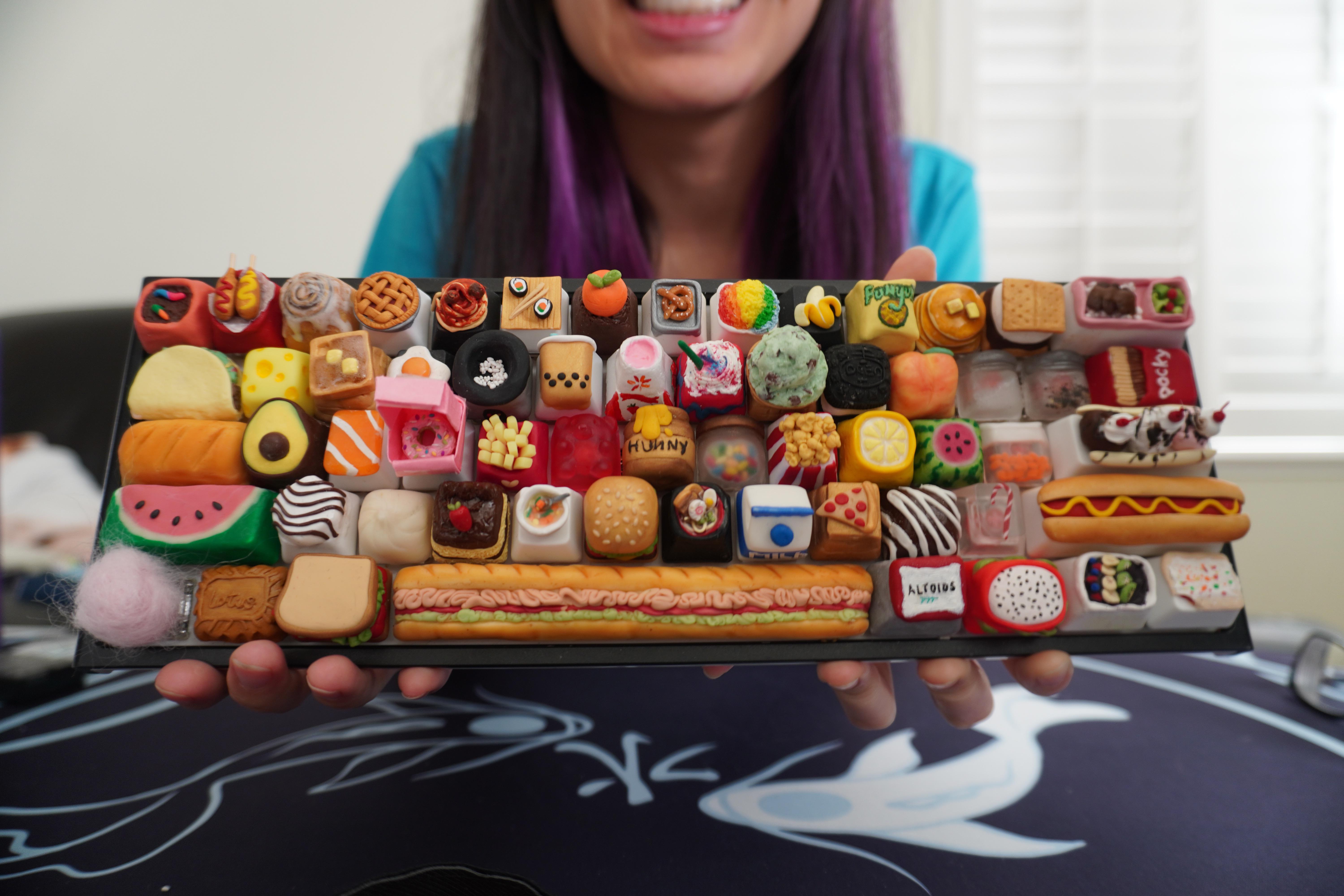
I present …the Smorgasboard, a keyboard full of food keycaps I made!
art
Comments
u/tinymakesthings · OP · 1.1K · Oct 9, 2020
I feel like this could totally get downvoted into oblivion but let me clarify some things first!
- This keyboard is an art project… not meant to be used as an actual keyboard!
- It took me about 11 months (almost a year) to finish this, as I was documenting the entire process on TikTok (usually 1-2 keys a week). I didn’t want to spam r/mk so I thought 1 post (I guess 2, counting the sub spacebar post) for it’s completion would be fine.
- Most of the keys correlate to the letter/symbol, and were taken from the suggestions made in the comments. A few of these keys are not designed to be used.
- Some keys are made with resin, some with clay, some with both (and one with cotton lul)
- TYPING TEST HERE! And I recap every one of the keys in the other part of the video as well, if you’re curious about what each key refers to.
- Probably going to… put a cover on this board and put it up on a pedestal or something. Feels too sad to separate the caps!
I do normally make caps that I eventually sell, and if you’d like to follow my general work, IG is probably the best place for that.
u/chad_ · 485 · Oct 9, 2020
not sure why you think it will be downvoted? I mean, sure… the keyboard is sort of an abomination on a whole but the individual keys are great! I love it!
u/tinymakesthings · OP · 310 · Oct 9, 2020
Oh, I’ve just had mixed results of posting artisan keycaps on r/mk, and in general, it feels like a majority of people here don’t like them (or aren’t interested in them)? So I figured a full board of them might not be well received xD
u/Fugu · 171 · Oct 9, 2020
I’m definitely an artisan keycap skeptic but these are baller as shit
u/chars101 · 59 · Oct 9, 2020
Me too, but this is beyond artesan keycap; this is a custom sculpted profile. :)
u/ShinyBurger · 6 · Nov 4, 2020
Just saw this and thought you should know your username is the name of a very popular artisan lol
u/chad_ · 31 · Oct 9, 2020
your wrist rest ( ՞ਊ ՞)→
u/FilthyFucknDirtyCock · 20 · Oct 10, 2020
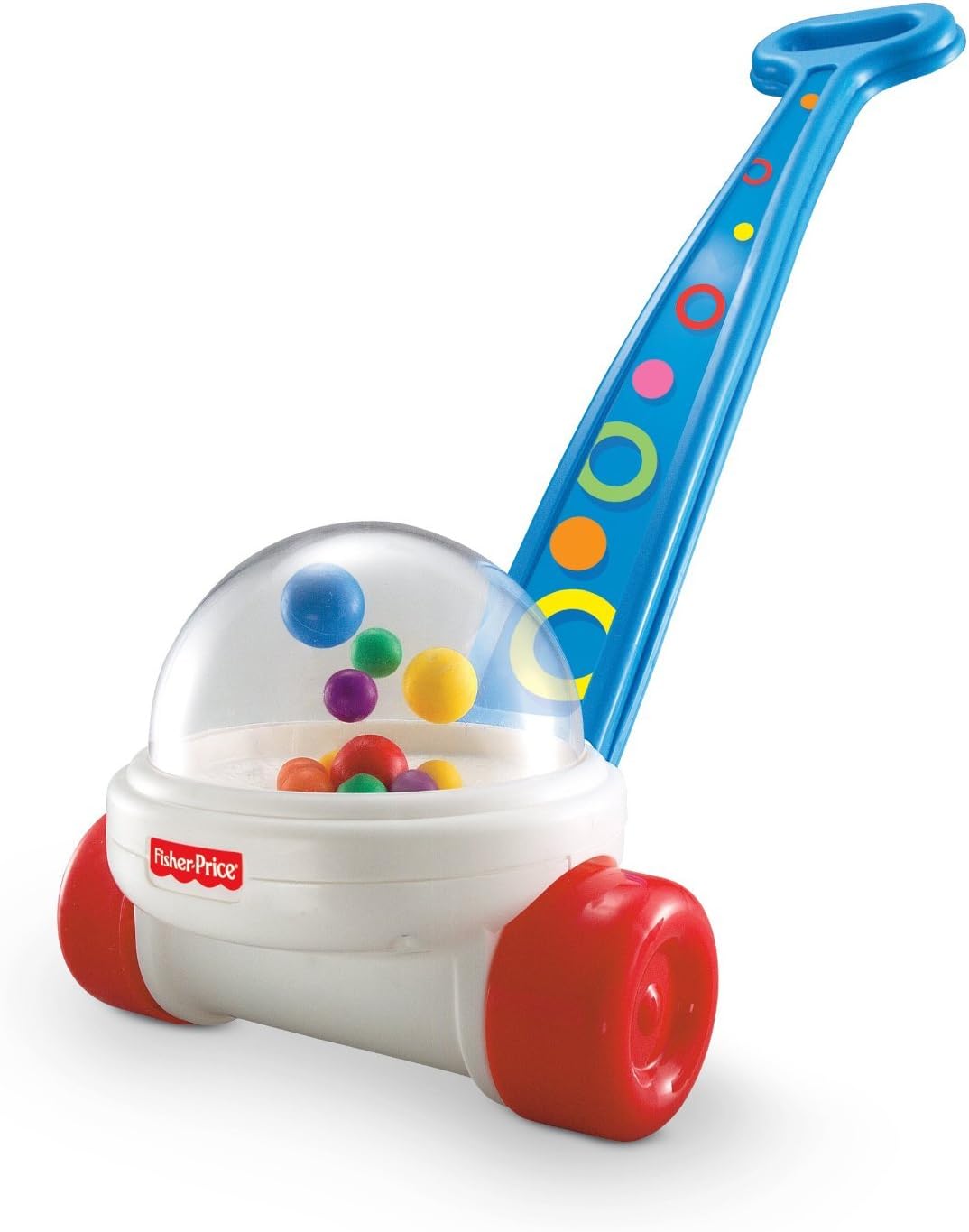
I have an awful idea for you that should never ever in the history of ever be executed: Keycaps that are like those fisher-price corn-popper baby toys. Every time you press a key it tosses a bunch of these balls around. Whilst typing, it sounds like rain!
u/tinymakesthings · OP · 8 · Oct 10, 2020
takes notes
u/heyitzmarcus · 2 · Oct 10, 2020
oh shit
u/dracloak · 9 · Oct 9, 2020
I have been following you on tiktok. Surprised I hadn’t seen more of you here!
u/spacewolfplays · 5 · Oct 9, 2020
i believe you. But that’s also so dumb of r/mk. silly people. i definitely learned about artisans here.
[deleted] · 1 · Oct 10, 2020
Imagine calling someone dumb for having an opinion you don’t like.
u/spacewolfplays · 2 · Oct 10, 2020
imagine being personally offended because someone generalized about an entire subreddit.
[deleted] · 1 · Oct 11, 2020
Imagine calling someone dumb for having an opinion you don’t like.
Please point out the part from my sentence which indicate I’m personally offended. I was just pointing out your stupidity which is actually hilarious, hence the “imagine” part.
u/spacewolfplays · 0 · Oct 11, 2020
Imagine calling someone dumb for having an opinion you don’t like.
That part. You were offended enough to comment. AND comment again. Lol.
[deleted] · 0 · Oct 11, 2020
You’re assuming someone’s offended because you want to see the reality that way.
But honey, someone stating the truth doesn’t mean they’re offended. I mean I don’t even belong to the category (“Dumb r/mk people who hate artisans”) you were referring to anyway, so why would I be offended? You’re just making me laugh, that’s it. (I bet even after saying this your brain still processes this as being offended haha)
u/WhiteStripesWS6 · 3 · Oct 10, 2020
I’m not around here a super lot anymore but back when I got in the Keeb game this sub loved artisans. Didn’t realize that changed.
u/TeamRedundancyTeam · 1 · Oct 10, 2020
Seems like not that long ago most of the </r/all> posts I saw from this sub were artisan caps.
u/vampyblot · 0 · Oct 10, 2020
I watched this whole series on tiktok
u/gilescope · 0 · Oct 10, 2020
Is there a specialised subredit for artisan keycaps? They maybe marmite ( you either love them or hate them) but maybe let’s have a place where people just love them?
u/ChefBoyAreWeFucked · 0 · Oct 10, 2020
I’d say most people here like an artisan keycap.
u/Laughmore · 0 · Oct 10, 2020
I’m usually not interested, but the variety here is enough for anyone to find something desirable… everyone’s got a fave food.
I didn’t know I wanted a waffle or popcorn cap.
u/LavendarAmy · 6 · Oct 10, 2020
Probably because she’s a girl and there are a lot of incels in reddit
u/chad_ · 1 · Oct 10, 2020
Fair. And sad.
u/yhelothere · 3 · Oct 10, 2020
Because this sub is a circlejerk.
u/VeryEpicness · 1 · Oct 10, 2020
Aren’t all subreddits?
[deleted] · 1 · Oct 10, 2020
This one is particularly bad though.
u/SugaaH · 1 · Oct 10, 2020
rmk can be quite random sometimes :)
u/chad_ · 0 · Oct 10, 2020
s/rmk/reddit
u/GreyHexagon · 0 · Oct 10, 2020
I feel like usability is t really required in this sub. People post the unicorn vomit stuff where all the caps are from a grab bag, or those keyboards with two switches that convert binary, or custom stenograph layouts, all of which are pretty unusable for most people
At the end of the day we like pretty things here, and this is a pretty thing.
u/chad_ · 2 · Oct 10, 2020
I would say it is a collection of pretty things. On a whole it is a bit of an oddity but very awesome and skilled.
u/CongealedAnalJuice · -19 · Oct 9, 2020
I downvoted because I’m tired of seeing ads disguised as content
u/chad_ · 9 · Oct 9, 2020
I like the direct diy mech stuff myself. I am also prone to upvoting game devs who share their stuff, as well as other artists and creators. To each their own, I guess.
u/gin_and_toxic · 46 · Oct 9, 2020
Answer to all </r/diWHY> questions: it’s an art project 🤷♂️
u/tinymakesthings · OP · 41 · Oct 9, 2020
My TikToks were actually reposted on r/diWHY awhile ago (by someone else) and there was definitely a lot “but why” comments and it ended up getting removed because… art… was the reason why, haha.
u/timelesscookie · 22 · Oct 9, 2020
I sure as hell wasn’t expecting the loaf of bread wrist rest, that’s amazing and fits your board perfectly. How does it feel? I find wooden ones too hard.
u/tinymakesthings · OP · 15 · Oct 9, 2020
It feels like memory foam - so soft, but not too soft! I like it but I think it’s definitely more of a novelty thing though, I hear the outside coat kinda wears out after awhile… (mine has started to peel a bit). But for $14 or so, I think it’s fun haha. (search Amazon for bread wrist rest, and it should be the top result!)
u/timelesscookie · 1 · Oct 10, 2020
thanks! sounds fun, if that was your affiliate link in that deleted comment I wouldn’t mind using it if you dm me
u/Tigerkix · 10 · Oct 9, 2020
Have you ever accidentally eaten your wrist rest instead of your sandwich?
u/ChillKeebs · 2 · Oct 9, 2020
Lmaooooo that typing test
So fun! Super cute work as always!
u/onebigdoor · 3 · Oct 9, 2020
i was going to say my favorite part was the pooh bear hunny pot, but it’s not, it’s your smile because you made something spectacular, and you should feel amazing!!! (i keep hitting the up button but it only works once…*goes off to create more accounts*)
[deleted] · 1 · Oct 12, 2020
Love that baguette wrist wrest?
u/ChirsF · 2 · Oct 10, 2020
This thing is awesome. I’ve been watching the ig posts and wondered what might come next. I’m sad this is done.
As a side note as a possible suggestion: Sell it for charity and donate the funds to the Ronald McDonald House near you when you’re ready to part with it, if ever. They do good work keeping families near one another who couldn’t afford to otherwise when kids are in the hospital.
[deleted] · 1 · Oct 9, 2020
You stating that it’s an art project is all I need to give you this damn upvote.
Cotton Candy is probs my fave
u/k4rm4cub3 · 1 · Oct 9, 2020
this is the cutest keyboard in the universe. the only way this could be cuter is if the keyboard, too, was tiny.
u/DoktorLuciferWong · 1 · Oct 10, 2020
not meant to be used as an actual keyboard!
Cowards, I say!
u/SexyR63VinylScratch · 1 · Oct 10, 2020
“Not meant to be actually typed on”
Are you challenging me!?
u/ablrockz · 1 · Oct 10, 2020
i follow you on twitter, BUT THE FACT THAT THE KEYS ARE ALPHA COORDINATED IS SO <3__<3
u/indian_weeaboo_69 · 1 · Oct 10, 2020
Downvoted?
I’m a massive foodie and I would pay good money for that Spacebar and the Omlette as my esc key
u/EMCoupling · 0 · Oct 10, 2020
Tiny please you are among the best artisan sculptors out there, how could anyone dislike this?!
u/bigcityhawk · 0 · Oct 10, 2020
Can you explain what each key is and what inspiration you had to create that food/key?
u/jroddie4 · 0 · Oct 10, 2020
when’s the GB drop for the sandwich bar
u/Python4fun · 0 · Oct 10, 2020
All I could think when I saw it was that I would HATE trying to type on this, but if it’s intended as art then that’s another story. It’s very cool to look at.
u/SSnickerz · 0 · Oct 10, 2020
No need to explain. The keyboard is awesome and one of a kind. No one can hate something that’s this awesome.
u/CongealedAnalJuice · -11 · Oct 9, 2020
Thanks for posting a fucking ad
God this site sucks now.
u/Geekatori · 200 · Oct 9, 2020
</r/forbiddensnacks/>
u/DLC_Franco · 206 · Oct 9, 2020
An absolute legend.
The space bar is next level lmfao
u/Breene · 15 · Oct 9, 2020
I was looking for the first space bar comment, found it!
u/Krasztest01 · 64 · Oct 9, 2020
Legendary post. It was fun watching you post these weekly. I was hoping for a 130 wpm test but that would probably turn this into a giant salad :)
[deleted] · 9 · Oct 9, 2020
That donut box would hurt so bad
u/OrangeCreeper · 1 · Oct 18, 2020
Oh boy I just saw it This is definitely a novelty keyboard but it’s super cool nonetheless, it’s awesome to see people do stuff like this!
u/succubitchin · 336 · Oct 9, 2020
As someone with anxiety, I want to fight you.
As someone who likes food, 10/10
u/Wishbone51 · 31 · Oct 9, 2020
I second this
u/Cuda14 · 13 · Oct 9, 2020
Me three
[deleted] · 7 · Oct 10, 2020
holy fuck the amount of people completely overlooking the point of the comment. ITS ABOUT THE HOW ARTISAN KEYCAPS ARE FUCKING EXPENSIVE AND THERES A LOT OF THEM IN ONE PICTURE. leave it to redditors to overlook the entire point of a comment AND stigmatize mental health
u/s_nifty · 4 · Oct 10, 2020
not expensive if you don’t need to buy them :v
u/Ginogenson · 2 · Feb 20, 2021
takes money to make them bro
u/BleedinSkull · 33 · Oct 9, 2020
I just realized every letter coheres to a related food item. EX: Letter “I” is a scoop of Ice Cream.
That’s pretty fucking clever.
u/SnatchSnacker · 14 · Oct 10, 2020
Don’t miss the “ALT-oids”
u/BorisDirk · 15 · Oct 9, 2020
Chocolate for period, I see what you did there lol
[deleted] · 3 · Oct 12, 2020
Buzzfeed stole your comment. Bravo.
u/BorisDirk · 1 · Oct 12, 2020
Ooh, have a link?
u/Linshanshell · 2 · Oct 10, 2020
Omg i didn’t even notice that ahaha
u/malbiz · 91 · Oct 9, 2020
If every artisan keycap is worth 100 dollars (stated in the commission page), then this 65% keyboard would cost 6,700 dollars.
I don’t know if the cotton candy (bottom left corner pink fluff) is supposedly an artisan keycap though.
u/Lamau13 · 49 · Oct 9, 2020
its not always about the money spider-man
u/DickButtVanDyke · 15 · Oct 9, 2020
Money Spider-Man sounds like a weirdly practical offshoot character. He solves problems by shooting money at them instead of webbing.
[deleted] · 2 · Oct 9, 2020
“I’m just like the spider that gave me my powers see? Both of us are rich.”
“But money spider man, how is that a super power?”
“Oh! Yeah, so I bite them and fill their blood with money and then I hang them up in my money net and eat them”
u/glow2hi · 1 · Oct 10, 2020
I’d read it.
u/db2 · 1 · Oct 10, 2020
Not to be confused with Money-Spider Man
[deleted] · 0 · Oct 10, 2020
Hey piderman
u/itisoktodance · 13 · Oct 9, 2020
I mean, it took her 11 while months to make the thing, so I’d say it’s worth much more than the worth of the individual caps combined.
u/masniu · -4 · Oct 10, 2020
She made them she didn’t buy them
u/supreme-diggity · -10 · Oct 10, 2020
Wow I wouldn’t spend a single cent on any of these
[deleted] · 12 · Oct 9, 2020
I love the subtle placements.
The candy cane is on the ?
The < key has similarly angled pizza slice
Honey on H, Jelly beans on J, popcorn Kernals/Kettlecorn on K, Lemon on L,
The key with : and ; are the watermelon seeds!
Caps lock makes the bread rise!
and so on, its fun to work out :)
[deleted] · 19 · Oct 9, 2020
Oh my GOD literally every new one I notice is equally as amazing as the last these are INCREDIBLE AND YOU ARE SO TALENTED
u/Sparkspsrk · 27 · Oct 9, 2020
Pretty sure this should be the top post all time on this sub
u/-wepimpchimpin- · 7 · Oct 9, 2020
Did you make a TikTok series on this cause I watched somebody do this on TikTok and it might’ve been you 🤔
u/tinymakesthings · OP · 7 · Oct 9, 2020
Yes, that’s me!
u/-wepimpchimpin- · 2 · Oct 9, 2020
Cool!
[deleted] · 10 · Oct 9, 2020
This is absolutely wonderful…I didn’t even realize there was a reason for the placement of the keys until you explained it, and then the whole thing became 100x better
u/891st · 8 · Oct 9, 2020
~♫~ Kinda keycap kinda snack
Try to catch 'em in your trap
Its Keysnax! ~♫~
u/itisoktodance · 3 · Oct 9, 2020
And of course, the keyboard itself is a Tofu lol
u/polysculpture · 5 · Oct 9, 2020
Fantastic work! It has been really fun seeing you progress through these!
[deleted] · 5 · Oct 9, 2020
Type test please?
u/tinymakesthings · OP · 1 · Oct 10, 2020
[deleted] · 1 · Oct 10, 2020
This is better than I ever imagined
u/elfofresilience · 4 · Oct 9, 2020
so cool to see it altogether. you’re one of the first people I followed on tiktok, I can’t believe the board is done!
u/tehbingg · 4 · Oct 10, 2020
um… finger food…? HAHAH sorry
u/tinymakesthings · OP · 5 · Oct 10, 2020
I was actually waiting for someone to make this joke!!
u/tehbingg · 1 · Oct 10, 2020
HAHAH really nice job by the way!!
u/dahlenn · 2 · Oct 9, 2020
hahaha i love your videos on tiktok! recognized you the minute i saw the keyboard haha, been here since the first key
u/Trygle · 2 · Oct 9, 2020
Wow.
Love the Altoids for the right alt key lol
[deleted] · 2 · Oct 10, 2020
Jesus christ this is insane. I’d be wanting to eat my keyboard 24/7
u/Sindicatof · 2 · Oct 10, 2020
Ah yes, the Tabco, it’s awesome!
u/Apertures_ · 2 · Oct 10, 2020
Holy shit… are all the letter keys’ food based on the letter?
Was looking at the WASD keys and was like HMMM waffle, avocado, didn’t know S, then donut. Bravo!
u/SilenceSeven · 1 · Oct 10, 2020
S=Sushi
u/Apertures_ · 1 · Oct 10, 2020
Ah you’re right, salmon sushi at that!
u/RollinDeepWithData · 2 · Oct 10, 2020
What is the “U”?
u/tinymakesthings · OP · 3 · Oct 10, 2020
It’s a unicorn frappuccino (from starbucks). Had to get a little creative with that one haha!
u/RollinDeepWithData · 2 · Oct 10, 2020
Thanks! It was driving me nuts haha
u/Scrubasaur · 2 · Oct 11, 2020
A- avocado, B- burger, C- cake, D- donut, E- egg, F- fries, G- gummy bear, H- honey, I- ice cream, J- jelly beans, K- karamel popcorn?, L- lemon, M- milk, N- noodles?, O- (not sure), P- peach, Q- Queso, R- rice, S- salmon/sushi, T- tea?, U- (not sure), V- veggie soup?, W- waffles, X- (not sure), Y- yogurt, Z- zebra cake.
u/shit_streak · 1 · Feb 17, 2021
I just realized every letter coheres to a related food item. EX: Letter “I” is a scoop of Ice Cream.
o for oreo. I thought t was for tapioca. I think x is for xiao long bao. I’m not convinced r is for rice since it’s an almost empty bowl of rice then.
u/Turbovdub00 · 2 · Oct 9, 2020
Anyone who downvotes needs to get slapped. You won me with the Zebracake! The donut is Insanely good and the Gummybear! Def going to watch the video to know what some of those foods are. I got most but some I’m stumped on. It’s a fun guessing game to see if you get them all right and review the answers later with the video. Epic work!
u/kaibtw · 2 · Oct 9, 2020
I follow you on tiktok and love your keys
u/ZippZappZippty · 0 · Oct 10, 2020
big deal, you save alot of people
[deleted] · 2 · Oct 10, 2020
Imagine waking up after a night of drinking and finding a bite taken out of your keyboard
u/citystatic · 2 · Oct 10, 2020
I think it’s awesome and you should be proud. My favorite are the pie and the pancake!
u/s0l0Kill · 2 · Oct 10, 2020
Big fan :)
u/TheSirCheddar · 2 · Oct 10, 2020
tiny! these are super cute! nice work c:
u/NamesThatEndTooSoon · 2 · Oct 10, 2020
I think r/ATBGE would like this but not because it’s bad or anything I think it’s amazing actually, I just hink those guys would like it too
u/tx47e · 2 · Oct 9, 2020
good luck typing on that!
u/Peabie · 1 · Oct 9, 2020
This is soooo cute!!!
u/88OuttaTimeGG · 1 · Oct 9, 2020
This made my day, I love it! ‘Taco’ for ‘Tab’ is pogChamp 😂
u/klystron2010 · 1 · Oct 9, 2020
icuabkx3wefilseryligne hgieur bgyeksrygcbiseurg syeiug esig
BURP
u/Whooshless · 1 · Oct 9, 2020
Nice Mizu mat. You have good… taste!
u/Serkaugh · 1 · Oct 9, 2020
I walkways see you on Instagram from your tiktok! It’s very nice!
u/lucid-soul · 1 · Oct 9, 2020
The old cliche: I don’t know art, but I know what I like. I’d 100% hang this on my wall in a display case.
u/reliableVCR · 1 · Oct 9, 2020
I bet it tastes terrible.
u/ChernobylChild · 1 · Oct 9, 2020
It’s like a train wreck, I hate it but I can’t stop looking at it.
u/Garewolf · 1 · Oct 9, 2020
FUNYUNS!
u/CamBoy750 · 1 · Oct 9, 2020
I think it looks awesome but would be a nightmare to type on with all the different textures and sizes lol
u/zacheadams · 1 · Oct 9, 2020
Quality as always, Tiny!!
u/IronMermaiden · 1 · Oct 9, 2020
What’s throwing me off is the 1 key being 2 corndogs, but i audibly "haaaaa"d at the pie being 3 :)
u/Axariel · 1 · Oct 9, 2020
Some of these def. stand out more than the rest, but all of them are pretty 🔥 🔥 🔥 .
Great work!!
[deleted] · 1 · Oct 9, 2020
Tiny you so cray.
I love it.
u/sendrim · 1 · Oct 9, 2020
I followed along the process and really enjoyed seeing it! Amazing end result! :D
u/cortlong · 1 · Oct 9, 2020
I’ll give you 50 bucks for that sandwich space bar. That shit is hot.
u/GC_and_Tech · 1 · Oct 9, 2020
I am hungry now…
u/Brody_sack01 · 1 · Oct 9, 2020
I’ve seen a couple of your progress videos on tiktok, yes I know tiktok badddddd Great joh on this
[deleted] · 1 · Oct 9, 2020
And they actually resemble the letters.
u/Ok_Cryptographer2209 · 1 · Oct 9, 2020
wait, did you take the first letter of the food as legend?
u/FormalChicken · 1 · Oct 9, 2020
I want that for the office just to confuse the fuck out of the old farts
[deleted] · 1 · Oct 9, 2020
Can someone please tell me how to change my name?
u/Captain_Void · 1 · Oct 13, 2020
You can’t
u/RememberToEatDinner · 1 · Oct 9, 2020
This is fucked but also amazing
u/rtu96 · 1 · Oct 9, 2020
This is really impressive. I love the thought that went into each character, like Queso Waffles Egg Rice Tea Yogurt
[deleted] · 1 · Oct 9, 2020
I cannot tell if I love or hate this
u/MarcusFenixCSS · 1 · Oct 9, 2020
Imagine trying to press E
u/beepboopbapbeepboop · 1 · Oct 10, 2020
Thanks I hate it
u/kwiksi1ver · 1 · Oct 10, 2020
That cotton candy is out of control.
u/4RTH_R · 1 · Oct 10, 2020
I love the lotus speculoos option key! My favourite cookie, especially when dipped into coffee!
u/ABigRedBall · 1 · Oct 10, 2020
That’s amazing
u/Toxic_Luck · 1 · Oct 10, 2020
I want to eat it! (º ﹃ º ) (º ﹃ º )
u/partingmouth · 1 · Oct 10, 2020
Mint ice cream and the pancakes in the top row and phenomenal
u/TheDrazka · 1 · Oct 10, 2020
Omg this is amazing
u/Vellioh · 1 · Oct 10, 2020
Is…is that cap just a cotton ball glued to a switch? lol
u/DancingSpaceman · 1 · Oct 10, 2020
Impressive, but can it read?
u/mgonsan_ece · 1 · Oct 10, 2020
This could be a great way to decide what to eat. Just press a random key and make/order whatever you land on!
u/ThisIsFuz · 1 · Oct 10, 2020
Xiao long bao X! I love it.
[deleted] · 1 · Oct 10, 2020
I absolutely love the baget wrist rest
u/AliveFromNewYork · 1 · Oct 10, 2020
This stirred visceral memories of toys from childhood. I love this keyboard. It looks like it would fun to touch
u/Ayubus741 · 1 · Oct 10, 2020
Hey, I followed your progress on tiktok! The keyboard looks awesome!
u/SpeedyHammer · 1 · Oct 10, 2020
That’s very cool. Do you type on stuff like this or is it just for show. For me, there’s no way I could type on that.
u/Ralanost · 1 · Oct 10, 2020
Of all the bagged snacks to represent, Funyuns?
u/Bkwordguy · 1 · Oct 10, 2020
</r/ATBGE>
u/Pand3rBear · 1 · Oct 10, 2020
But like realistically I wanna actually try using this thing 🤣🤣☠☠
[deleted] · 1 · Oct 10, 2020
Wow, thank you for this huge dose of whimsy. Your art brings joy.
u/ThePerson255 · 1 · Oct 10, 2020
Queso, waffle, egg, rice, tea, yogurt… this keyboard is pretty neat.
u/Jaekylls · 1 · Oct 10, 2020
Cotton Candy + Spaghetti
Jaekylls has left the game.
Edited 'cause I’m dumb and on mobile.
u/ppatches24 · 1 · Oct 10, 2020
Welp. I don’t think I’ll ever see a better keyboard in my life.
[deleted] · 1 · Oct 10, 2020
This is fucking awesome.
u/peppage · 1 · Oct 10, 2020
This might be the best keeb to play cook serve delicious on?
u/Sibraxlis · 1 · Oct 10, 2020
breaks keyboard going for D to E
[deleted] · 1 · Oct 10, 2020
This is awesome, really cool
u/HyFinated · 1 · Oct 10, 2020
I glanced at it and was like, “holy shit, the letters are actually there!!!”
Now I know I’m using a Quiche Waffle Egg Rice Tofu Yogurt keyboard.
u/blazerboy3000 · 1 · Oct 10, 2020
Duuuuuuuuuuuuuuuuuuuuuuude, so fucking cool
u/Ladybanger76 · 1 · Oct 10, 2020
this looks tasty af
u/AkatoShi · 1 · Oct 10, 2020
Wow, I love it! Good work of art, I especially love the Cotton Candy left CTRL and Hotdog right shift. Thanks for sharing!
u/ericwanggg · 1 · Oct 10, 2020
Been following you on tiktok since you just started on this alphabet food keyboard!! Finished product looks amazing :)
u/zerglingrush43 · 1 · Oct 10, 2020
Keyboard food
u/kempol · 1 · Oct 10, 2020
Okay what is that CTRL?
u/AltimaNEO · 1 · Oct 10, 2020
Thems are cute as heck!
[deleted] · 1 · Oct 10, 2020
i remember this on tiktok from day 1
u/Moist_beefnugs · 1 · Oct 10, 2020
Lol I thought the middle keycap said horny
u/kermit_the-fr0g · 1 · Oct 10, 2020
i saw you make practically every keycap,love ur tiktok <3 the entire board turned out so nice
u/Nyuusankininryou · 1 · Oct 10, 2020
Smörgåsbord
u/HungShota · 1 · Oct 10, 2020
THAT FOOTLONG SPACEBAR
u/najeanke · 1 · Oct 10, 2020
Typing on it must be a pita
u/sayonarabyez · 1 · Oct 10, 2020
I think I saw the tweet of this lol
u/sadsoftcat · 1 · Oct 10, 2020
ooh a subway spacebar I presume?
u/Cebrilung · 1 · Oct 10, 2020
Holu shit, this is simply amazing!I think your creation should be displayed in an art museum or something :D
Although, your spacebar needs more pickles.
u/Hub-The-Nub · 1 · Oct 10, 2020
What switches?
[deleted] · 1 · Oct 10, 2020
No thanks, I’m on a diet.
u/filteredmind · 1 · Oct 10, 2020
What clay or modeling polymer do you use?
u/hoy83 · 1 · Oct 10, 2020
S is making me hungry
[deleted] · 1 · Oct 10, 2020
You are a genius! Is there anywhere with explanations of each key and why you chose them? I can understand like 90% of them and why, but it would be super cool to see a breakdown of them all.
Great work!
u/Neozetare · 1 · Oct 10, 2020
You finally finished it! It’s weird, I feel so proud of you aha
u/DopeFrancis · 1 · Oct 10, 2020
Damn it! Why can you only upvote once per submission on this website?
u/Teto93 · 1 · Oct 10, 2020
I would use this as a second keyboard and map each food key to a macro that would order a delivery of something relevant to the key being pressed.
[deleted] · 1 · Oct 10, 2020
you are a genius
[deleted] · 1 · Oct 10, 2020
HUИNY
u/_zipfile · 1 · Oct 10, 2020
Just wow
[deleted] · 1 · Oct 10, 2020
u/lilgamelvr · 1 · Oct 10, 2020
Looks neat
u/mattortz · 1 · Oct 10, 2020
Are you my sister? Lol
u/tinymakesthings · OP · 1 · Oct 10, 2020
bahaha, coincidentally enough, i thought the same thing a couple months ago xD
u/mattortz · 1 · Oct 10, 2020
Lmao woww
u/TEzNJ · 1 · Oct 10, 2020
Interesting
u/Poschta · 1 · Oct 10, 2020
This sub was never supposed to make me hungry! I love that hot dog shift key :D
u/m4rsh13 · 1 · Oct 10, 2020
I wonder what’s the max WPM someone can get on this
u/JadAlJabali · 1 · Oct 10, 2020
I love this piece of art so much… I think that if you ordered the foods based on the first letter of their name it would’ve been better.
u/SveaTheSerg · 1 · Oct 10, 2020
Can’t find anyone commenting on the name, “Smorgasboard” is the englishification of the Swedish “smörgåsbord” witch is a meal served as a buffet with multiple hot and cold dishes of various foods on a table.
The word literally translates to “sandwich-table”
u/moregoo · 1 · Oct 10, 2020
u/SamL214 · 1 · Oct 10, 2020
I just want the hamburger
[deleted] · 1 · Oct 10, 2020
Forbidden mukbang
u/starpuffy · 1 · Oct 10, 2020
Oh wowww!!!
u/jezzackk · 1 · Oct 10, 2020
Want space shift and s key plz
u/SickstySixArms · 1 · Oct 10, 2020
Man, bravo - this is the best thing ever. I keep joking with friends that if I had $40,000 to completely throw away, I’d a full keyboard of Dwarf Factory Cheese.
This is the closest feasible thing to seeing that dream come true. lol
u/k00g · 1 · Oct 10, 2020
absolutely gorgeous!
u/jkaos92 · 1 · Oct 10, 2020
You first got my attention, now you got me hungry
[deleted] · 1 · Oct 10, 2020
The fairy floss/cotton candy key is funny af
u/SnowPenguin_ · 1 · Oct 10, 2020
I quite like how it looks like. Not sure if it’s a coincidence, but I like how the M key has Milk in its place, and the C key has Cake.
If you don’t mind, I will post the picture in my Twitter account. It’s so beautiful no to do so :D
u/tinymakesthings · OP · 1 · Oct 10, 2020
It’s not a coincidence, haha, most of the keys are made in relevance to the letter/symbol it’s on!
And I’d appreciate it if you didn’t repost on Twitter, you can just RT my tweet.
u/KentuckyFriedEel · 1 · Oct 10, 2020
Sticky keys
[deleted] · 1 · Oct 10, 2020
I think it is suitable for this: Source code example

u/Primelily · 1 · Oct 10, 2020
Award worthy. This is cool!
u/k3llycakes · 1 · Oct 10, 2020
i really enjoyed these tiktok videos! i’ve also followed you on twitter for forever! makes me want to make myself a lil artisan cap myself!!
u/turdler89 · 1 · Oct 10, 2020
u/Bones513 · 1 · Oct 10, 2020
Beautiful! I understand your concern in your comment since it’s obviously only made for display use, but this is so well done it totally pays off and then some.
u/BadGalBalrog · 1 · Oct 10, 2020
THIS IS SO AMAZINGGGGGG
[deleted] · 1 · Oct 10, 2020
Apricot - Sushi - Dthing - Fries
Thats awesome lol
u/b0urb0n · 1 · Oct 10, 2020
I’d like to watch the process but unfortunately there is no way I’ll ever use TikTok. Kudos for your awesome job
u/tinymakesthings · OP · 2 · Oct 10, 2020
I did compile all the TikToks into Youtube videos (3 parts, part 1 is here). I had to use different music and the videos aren’t made for YT so it’s not an optimal watch, but they’re there if you want!
u/b0urb0n · 1 · Oct 10, 2020
Thank you !
u/faiz0r · 1 · Oct 10, 2020
WPM: sushi
u/Alibo678 · 1 · Oct 10, 2020
Looks like my keyboard considering all the food in it
u/Snow-Shy · 1 · Oct 10, 2020
I like ur keeb my favorite rapper.
[deleted] · 1 · Oct 10, 2020
I want to eat the whole keyboard.
u/Rynoceraptor · 1 · Oct 10, 2020
W is Waffles, A is Avocado, S is Sushi, D is Donut, Alt key is Altoids.
I love the attention to detail here. This is amazing.
u/Geno0o · 1 · Oct 10, 2020
This is something I wouldn’t use but It definitely be something I would be proud to look at
u/Martyrialism · 1 · Oct 10, 2020
I shudder to think how my C-S: Go performance would suffer with this set-up, however my strength lies in my tactical approach rather than reaction speed (as one begins to slow in one’s 20s). Therefore theoretically if we knew each other I would be up for the challenge ;)
u/Shloopadoop · 1 · Oct 10, 2020
We need a sound test so badly
u/BeardedBears · 1 · Oct 11, 2020
Dunno about the cotton candy one… Seems like the fibers could get stuck under other caps or in switches. But everything else is unbelievably cool and we’ll done! I love that space bar!
u/Kevin_N_Sales · 1 · Oct 11, 2020
IDGAF! That cotton candy is genius!
u/nata-reelnaem · 1 · Oct 12, 2020
The only acceptable keyboard for playing fruit ninja pc
u/diredesire · 1 · Oct 12, 2020
tiny numba one
[deleted] · 1 · Oct 13, 2020
Dude this is SICK! I saw it forever ago on TikTok when it was in progress, this is incredible
u/TNpantelope · 1 · Oct 25, 2020
I want to type on that
[deleted] · 1 · Oct 26, 2020
^(^(^(^(wot))))
u/FarDust · 1 · Nov 4, 2020
looks nice!
u/TheDigeridontt · 1 · Nov 4, 2020
Eat it.
u/Jarrik02 · 1 · Nov 4, 2020
But most importantly, can you type on it?
u/9Barca9 · 1 · Nov 4, 2020
Epic
u/geoshuwah · 1 · Nov 6, 2020
Mmmm keyboard
u/Gape_Mahsole · 1 · Nov 15, 2020
saw this on tiktok and loved the series <3
u/Chickenguy2 · 1 · Oct 9, 2020
So you’re the person that I’ve been seeing on tiktok making all those cool custom keycaps, it’s really cool to see it come to completion! (Please don’t hate on me for using tiktok Reddit)
u/pimnacle · 1 · Oct 9, 2020
This is god tier
u/MrVesPear · 1 · Oct 9, 2020
I’ve seen you on tik tok a couple of times I think! Very cool!
u/IDontKnowFuckThat · 1 · Oct 10, 2020
u/Scrunchface0 · 1 · Oct 9, 2020
Yessss
u/RoseEniam · 1 · Oct 9, 2020
Lmao this is great
Edit: that cinnamon roll is chefs kiss
u/YukiPho · 1 · Oct 9, 2020
How does it taste? :3
u/Baechupurple · 1 · Oct 9, 2020
It looks niceee
u/holmyliquor · 1 · Oct 9, 2020
That sushi one is fye
u/KMS_XYZ · 1 · Oct 9, 2020
So tasty… bit useless, but beautiful custom.
u/natemcrice · 1 · Oct 9, 2020
It’s looks really good! Though typing on this would be an actual nightmare.
u/b0p_taimaishu · 1 · Oct 9, 2020
Hi Tiny!!
[deleted] · 1 · Oct 9, 2020
Homajineo just reccomend Ed u
[deleted] · 1 · Oct 9, 2020
Holy crap this is amazing ahahaha
u/ANTONIOPSD · 1 · Oct 9, 2020
Press Fries to pay in McDonald’s
u/veni-veni-veni · 1 · Oct 9, 2020
Oooh, I should play BurgerTime with this!
(But seriously, AWESOME job OP)
u/pbjames23 · 1 · Oct 9, 2020
THIS is the final absolute end game.
[deleted] · 1 · Oct 9, 2020
This is a monstrosity… in a good way.
NGL, I need that party sub spacebar.
u/slayerkitty666 · 1 · Oct 9, 2020
This is so cool you absolutely should put it in a glass box or something and display it in your home! What are the glass jar looking things next to the Pocky?
u/tinymakesthings · OP · 3 · Oct 9, 2020
That would be salt and pepper! I encapsulated real salt and pepper, though the salt became way more translucent than expected because it got “wet”, so it’s kind of hard to tell.
u/slayerkitty666 · 1 · Oct 9, 2020
That’s so neat!! I get it now, thanks for responding (:
u/glow3th · 1 · Oct 9, 2020
What about making an online food order by typing on a food keyboard?
u/tinymakesthings · OP · 3 · Oct 9, 2020
Something in the works ;)
u/nikosuniverse · 1 · Oct 9, 2020
i like how they corospond to the letter. Life the button for F is FRIES
u/sillybear25 · 4 · Oct 9, 2020
I like the top row, too. @ is a cinnamon roll, ^ is a carrot, & is a pretzel, etc.
u/nikosuniverse · 1 · Oct 10, 2020
yeah, for some foods on the keyboard I don’t know the english names but i think they also fit
u/sillybear25 · 1 · Oct 10, 2020
Yeah, the letters all correspond to the foods depicted, though a few of them are a bit weird, like the cheese on the Q key, (which is probably from the Spanish word Queso) or the U key (which I’m guessing is supposed to be a Unicorn Frappuccino from Starbucks).
[deleted] · 1 · Oct 9, 2020
OMG I WATCHED YOU DO THIS ON YOUR TIKTOK
u/ahopefulhobbit · 1 · Oct 9, 2020
The mint chocolate chip ice cream is super realistic
u/commodorepickle · 1 · Oct 9, 2020
This is making me hungry for second lunch
u/katiequark · 1 · Oct 9, 2020
I WANT ONE
u/CramZap35 · 1 · Oct 9, 2020
What is your words per minute on that bad boi lol
u/Mikelico55 · 1 · Oct 9, 2020
WOW
u/MilkshakeRD · 1 · Oct 9, 2020
Hey I was there from the start on your tiktok!
u/justjkl · 1 · Oct 9, 2020
work of art!! delicious looking art!
u/VanellopeVonSplenda · 1 · Oct 9, 2020
It’s so beautiful. 😭
u/bobalink7 · 1 · Oct 9, 2020
G l i z z y button 0_0
u/silvermud · 1 · Oct 9, 2020
I just noticed that most of the foods correspond to the letter they represent. Avocado for a, Q for queso, w for waffles, etc. Awesome
u/KeebNerd · 1 · Oct 9, 2020
An absolute work of art. Waiting for your next project!
u/snax_well · 1 · Oct 9, 2020
Been watching this progress and it is just the best! congrats on finishing it!
[deleted] · 1 · Oct 9, 2020
Damn that’s cool
u/KyleTheBoii · 1 · Oct 9, 2020
Loved watching you make the keycaps on tik tok! :D
u/nordenvonthule · 1 · Oct 9, 2020
Now I’m hungry
u/MikeyNub · 1 · Oct 9, 2020
Heh q for queso :)
u/spacewolfplays · 1 · Oct 9, 2020
OH YAY IT’S FINALLY DONE!!! LOOKS AMAZING!
u/online_citizen · 1 · Oct 9, 2020
Is that a foot long sub? Very nice!
u/Dink_TV · 1 · Oct 9, 2020
holy shit, nice work.
u/AtomicMokka · 1 · Oct 9, 2020
How has no one pointed out the abomination that is you L Ctrl lmao. This keeb belongs in a museum, great work!
u/buk-noy · 1 · Oct 9, 2020
Charcuterie board
u/spidergweb · 1 · Oct 9, 2020
This board makes me hungry. 10/10
u/jwpark3 · 1 · Oct 9, 2020
My fav is the banana!
u/DiabeticWaffle · 1 · Oct 9, 2020
My favorite is the Zebra Cake key cap. 10/10.
u/dankamushy · 1 · Oct 9, 2020
These are cool as fuck
[deleted] · 1 · Oct 9, 2020
Ramen. Mint Chocolate Chip. Chocolate Cake. Fried Egg.
u/brickabrak · 1 · Oct 9, 2020
Theyre all amazing but my favorite is definitely the spacebar. Well done!
u/Bitbatgaming · 1 · Oct 9, 2020
can i eat the space bar
u/Eternal_Practice · 1 · Oct 9, 2020
I hate looking at this, but I have to respect the skill that went into making this.
Great job you’ve done, now please keep it behind closed doors.
u/frecnbastard · 1 · Oct 9, 2020
Awesome. What’s your WPM on this bad boy? 😆
u/tinymakesthings · OP · 2 · Oct 9, 2020
Anywhere from 11 to 50 WPM hahaha. I’m normally 70-80 average, would love to see someone in the 150 range type on it!
u/000o00o00o00o000 · 1 · Oct 9, 2020
I love the pooh bear honey pot
u/GnomeAround · 1 · Oct 9, 2020
I love the sub for the space key!
u/DaftMau_5 · 1 · Oct 9, 2020
I would only use this when ordering food online
u/pabloescobyte · 1 · Oct 9, 2020
This has got to be the most NSFW image here! On a more serious note though you make the best caps! I always love seeing what you come up with.
Any chance you’d ever consider doing a photo book of your work?
u/tinymakesthings · OP · 1 · Oct 10, 2020
Thank you for the compliments!! I’m very flattered. But I feel like the caps here aren’t really of that high quality (seriously not trying to fish for compliments here, just my honest eval) - I think some of the caps are kinda thrown together and not as polished as I would like them to be (if I were say, trying to sell them).
u/pabloescobyte · 2 · Oct 10, 2020
I totally understand where you’re coming from. Nonetheless they look fantastic especially when you can see all of them together like this on a keyboard.
Keep up your wonderful work!
u/MurphyKing · 1 · Oct 9, 2020
I look at this keyboard as a whole and it’s so much to take it at once. But when I look at the keys individually it’s simply beautiful. Super cool
u/bloodwire · 1 · Oct 9, 2020
I love the wrist rest, because you can also have it for lunch. Also, love the keycaps. I would definitely put them into something for display.
[deleted] · 1 · Oct 9, 2020
I really love how the food caps are aligned with the letter. Is that a q for quiche?
u/tinymakesthings · OP · 1 · Oct 10, 2020
That’s actually a block of cheese (Queso). Had to stretch a little for that one haha. I think the other suggestion for that key was Quesadilla and I didn’t think that would look as good.
u/sleepjack · 1 · Oct 10, 2020
I love how each keycap correlates to the key itself. Altoids for Alt? Brilliant.
u/bobEddins · 1 · Oct 10, 2020
Do you have an Etsy!? I swear I’ve seen your burger and fries on there and I loved them!
u/juice_box_hero · 1 · Oct 10, 2020
Fake food is my favorite thing ever!! I don’t have a computer but I LOVE these so much!! Great job!!! I totally wish I had these or could make them myself!!
u/zodiacsoldier · 1 · Oct 10, 2020
I didn’t notice this before, but after watching her Video, the food on each letter starts with that letter !!!
u/Overwhealming · 1 · Oct 10, 2020
Where’s the any key?
u/Mongothewhat · 1 · Oct 10, 2020
it looks like, you used alot of different techniques and materials to make these. Youre quite the ‘jack of all trades’. Those are really awesome
u/alliekatt11 · 1 · Oct 10, 2020
This is incredible
u/QuadSeven · 1 · Oct 10, 2020
One of the coolest things I’ve seen on Reddit. Wow, well done!
u/juice_box_hero · 1 · Oct 10, 2020
Are you “Tiny Hands” that also made (or makes?) pendants and such?
u/tinymakesthings · OP · 1 · Oct 10, 2020
Hmm nope, not me!
[deleted] · 1 · Oct 10, 2020
I love that pretzel on a tray (F7?) and the mint chocolate ice-cream and snowcone look realistic! The long sub spacebar is hilarious. Amazing and a job beyond well done!
u/tinymakesthings · OP · 2 · Oct 10, 2020
Pretzel is the & (because it looks like one!) heh! Thank you!
u/tdk337 · 1 · Oct 10, 2020
I love your videos. Amazing keyboard.
u/theXXcircII · 1 · Oct 10, 2020
Chocolate Strawberry Cake Oreo Oreo Lemon Cake!
Also just realized each food actually represents the letter and isn’t just arbitrarily placed. Neato!
u/ZippZappZippty · 1 · Oct 10, 2020
Laurie should demand full custody of the kids.
u/Gambler_McCree · 1 · Oct 10, 2020
that’s awesome GJ
u/-Listening · 1 · Oct 10, 2020
Man Twitter is so full of anger and hate
u/Trailer2019 · 1 · Oct 10, 2020
We totally admire your artisan work and capabilities. Amazing job!!
u/ZippZappZippty · 1 · Oct 10, 2020
I found him…the fluffiest boy.
[deleted] · 1 · Oct 10, 2020
i follow you on tik tok lmfao
[deleted] · 1 · Oct 10, 2020
This looks so good! 🤤
u/TerabyteRD · 1 · Oct 10, 2020
the spacebar should’ve been dye sub
^(i’ll see myself out)
u/QuadsiusPrime · 1 · Oct 10, 2020
YUM!
u/ShlorpIsBored · 1 · Oct 10, 2020
Hopefully they’re gummies.
u/emocringelorduwu · 1 · Oct 10, 2020
That’s so cool holy shit
[deleted] · 1 · Oct 10, 2020
That’s awesome. So much detail and creativity in each and every keycap
u/drizzie1771 · 1 · Oct 10, 2020
Wow
u/Lawlerhat · 1 · Oct 10, 2020
i really like the sublegends on the spacebar
u/Superalex051 · 1 · Oct 10, 2020
when gunna wants a quick snack.
u/justranadomperson · 1 · Oct 10, 2020
imagine strafing in csgo or valorant
u/jakethedumbmistake · 1 · Oct 10, 2020
no amout of jpeg will hide that 9gag watermark
u/RogueSystem087 · 1 · Oct 10, 2020
For keyboard peoplez who’s always hungy X3
u/RogueSystem087 · 1 · Oct 10, 2020
For keyboard peoplez who’s always hungy X3!!!
u/RogueSystem087 · 1 · Oct 10, 2020
For keyboard peoplez who’s always hungy X3!!!
u/nostachio · 1 · Oct 10, 2020
I see the engineers’ definition of pi, 3.
u/Dean_Pe1ton · 1 · Oct 10, 2020
Imagine doing a PhD thesis using that…
u/toasttwithjam · 1 · Oct 10, 2020
AYYYYYY TINY, IT’S EKKO!:D This looks incredible! I’m so happy with how it turned out!!
u/tinymakesthings · OP · 1 · Oct 10, 2020
<3
u/Neck-Mindless · 1 · Oct 10, 2020
Am I the only person that hates artisans? They just look extremely tacky on any board.
u/tranerofmonsters · 1 · Oct 10, 2020
I love it, looks delicious.
u/LavendarAmy · 1 · Oct 10, 2020
I mean impressive but typing in that thing must be impossible
u/Cee-Dee-Bee · 1 · Oct 10, 2020
Wow, amazing effort. I love it!
You should get it framed behind glass, too good to touch 😁
u/offbeat2016 · 1 · Oct 10, 2020
I get that it would be difficult to use and all, but the artistry is beautiful!
[deleted] · 1 · Oct 10, 2020
I know you probably won’t see this but the fact that the z is a zebra cake made my day!
u/TailS1337 · 1 · Oct 10, 2020
Tea/Coffee Honey Avocado Tea/Coffee
(pistacchio) ice Salmon
Avocado Pancakes(?) Egg Salmon Oreo (that thing right Side of the Pizza) Egg
I mightve misinterpreted some of these, great piece of art though
u/bthezebra · 1 · Oct 10, 2020
Tiny is sooo creative and crafty
All Butts Matter!
u/07undercover · 0 · Oct 9, 2020
thats so cool!!!
feels like the keys would be unstable tho
u/bastardoperator · 0 · Oct 9, 2020
LOVE IT! This is awesome, get it into production, limit production, become a keyboard MILLIONAIRE!
u/random_redditer123 · 0 · Oct 9, 2020
No pinnapple I’m mad
u/questionable-morels · -2 · Oct 9, 2020
It’s hideous.
I love it.
[deleted] · -2 · Oct 9, 2020
To anyone saying it would be hard to type on, if you look at the keys it is organized, EX: f where fries are and the the black and white striped desert where a is, zebra?
u/thatishiss · -2 · Oct 9, 2020
Just here to be the 100th comment
u/GoGoGadgetPants · -2 · Oct 10, 2020
Are you single? Lol
[deleted] · 0 · Oct 10, 2020
God damn it
[deleted] · -4 · Oct 9, 2020
This will 100% be covered in cum after a year of use
[deleted] · -24 · Oct 9, 2020
Ew
u/SuperMysticalPerson · -2 · Oct 9, 2020
You must be anorexic
[deleted] · -7 · Oct 9, 2020
No ive got a good gut going on, that just looks ew…
u/shadowpants04 · 1 · Jan 1, 2021
I love the rShift key
u/tinymakesthings · OP · 1 · Jan 4, 2021
I just happened to see this comment but the hot dog shift is now available through Drop (through a collab with Dwarf Factory) to order if you’d like one yourself! :)
u/Commercial_Concert44 · 1 · Jan 13, 2021
I call it the Mukboard
u/coolmaster9000 · 1 · Feb 19, 2021
If all the letter keys are foods beginning with those letters (as I’ve noticed A is avocado, I is ice cream, O is Oreo, Z is zebra cake, P is peach…), what’s X meant to be? And the other keys for that matter
u/tinymakesthings · OP · 1 · Feb 19, 2021
X is for Xiao Long Bao (chinese for soup dumpling) - Had to be creative for some of the letters because they were hard to find foods with that letter. I go over every key in the YT video!
[deleted] · 1 · Feb 20, 2021
I love the boba keycap! I would buy one for my escape key or something.
u/Psychological_Log159 · 1 · Dec 7, 2022
cotton candy is making me mad
u/kasyafnazri · 1 · Jul 30, 2023
Can i eat that

Khiip kept the link to the original. Enable [media] download_videos to fetch the video file.
Watch at https://www.youtube.com/watch?v=T6hmdrsLQj8
Description
MY PRODUCTIVITY APPS 📝 Momentum: Energising Habits (iOS) - Download Here → https://go.sparkle.so/momentum/ytd 👻 Voicepal: AI Writing App (iOS/Android) - Download for Free → https://go.aliabdaal.com/voicepal/ytd
MY BOOK 📕 My New York Times bestselling book Feel-Good Productivity (2,000+ 5-star reviews) https://go.feelgoodproductivity.com/amazon/yt
MY COURSES 🚀 Build a $100k/year lifestyle business without quitting your day job → https://go.aliabdaal.com/lifestylebusinessytd 🧠 My Productivity System: LifeOS → https://go.aliabdaal.com/lifeos/ytd 🤑 Grow / Monetise your YouTube Channel → https://go.aliabdaal.com/ptya/ytd
CONNECT WITH ME 💌 Join LifeNotes, my weekly email where I share what I’m reading & learning: https://go.aliabdaal.com/lifenotes/yt 📸 Instagram: https://instagram.com/aliabdaal 👨💻 Linkedin: https://www.linkedin.com/in/ali-abdaal/ 🌍 My website / blog: https://www.aliabdaal.com/
The whole point of a productivity system is to get your life in order and free up valuable brain space. No one wants to be spending tons of time organising emails or searching for a book quote that they forgot to highlight.
There are broadly three levels of building an ultimate productivity system: keeping your life in order, capturing new info, and creating a system around it. You can stop at layer one or use all three. I cover it all in more detail in this video, including suggestions for apps that I like to use daily.
⌚️ TIMESTAMPS 00:00 Intro 01:37 Ron: keep your life in order 01:37 Calendar 04:21 Email 06:12 To-do list 09:06 File management 10:32 Hermoine: capture new information 11:09 Kindle 11:47 Read-it-later app 14:53 Readwise 15:59 Capture app 17:04 Dumbledore: create a system 17:07 Building a Second Brain
🔗 LINKS MENTIONED IN THIS VIDEO 🧠 Check out the Dumbledore Level with my Building a Second Brain video - https://youtu.be/K-ssUVyfn5g PS: I donate 10% of my income to charity every year. Would you like to join me? Learn more about the 10% Pledge: https://aliabdaal.com/giving-what-we-can/
Chapters
- 0:00 — Intro
- 1:37 — Ron: keep your life in order
- 4:21 — Email
- 6:12 — To-do list
- 9:06 — File management
- 10:32 — Hermoine: capture new information
- 11:09 — Kindle
- 11:47 — Read-it-later app
- 14:53 — Readwise
- 15:59 — Capture app
- 17:04 — Dumbledore: create a system
- 17:07 — Building a Second Brain
Transcript
Intro
0:00 in this video we are talking about how to build a productivity system and the first question to start with is why do you in fact need a productivity system and really the main reason is so that we can do the stuff that we want to do we can do things that are meaningful to us in an efficient way without wasting our time and so that we’re less stressed out doing it because then we don’t have to rely on our brain to do things that it’s
0:17 not designed to do and we can almost think of this as like a bit of a venn diagram where we’ve got the brain and we’ve got our system and broadly we can categorize tasks into one of three things so type one tasks are things that our brain itself does best these are things like creativity and enjoyment and relaxing and living in the present moment and all that fun stuff connecting
0:33 with other people all of this stuff totally cool if our brain does the thing then we’ve got type 2 types of thing which is stuff that like we often use our brain for but that our productivity system or some kind of system can probably do a little bit more efficiently for example things like keeping on top of tasks keeping on top of calendars keeping on top of emails
0:50 having to use our brain to remember all of that stuff is really taxing and quite stressful especially if you have a lot of stuff to be doing and then thirdly there is the type 3 stuff the stuff that we definitely should be using some kind of system for this generally involves kind of remembering information that is not directly connected to the things we actually care about so for example
1:08 memorizing phone numbers is a bit of a waste of time in a way memorizing a lot of people’s birthdays a bit of a waste of time you can just outsource that to a system like a calendar and so really the idea of a productivity system is well productivity is using our time intentionally and effectively and so the point of having a system for it is so that our brain doesn’t have to do so much work so anyway in this video we’re
1:24 going to talk about kind of three different layers of a productivity system that you can choose to build if you feel that it helps you with your life it certainly helps with mine and we’re going to split that into layer 1 which is ron layer 2 which is hermione and layer 3 which is dumbledore
Ron: keep your life in order
1:39 so the wrong layer i.e layer one of the system is all about keeping your life in order and there are really four things four different components that you need in a productivity system in my humble opinion to kind of get to a place where your life is reasonably in order let the feast begin the first one is a calendar now it is amazing how many people i know who
1:57 don’t live their lives based on a calendar and who are trying to remember in their own heads all of the information for like events that they need to attend a friend invites you for a birthday party two weeks from now oh it’s cool it’s fine i won’t write it down i will just try and remember oh i’ve gotta have dinner with my mum next week it’s fine i’m just gonna remember like our brain is so bad at remembering these things and one of the quotes that
2:15 i always come back to is from david allen who is one of the world’s biggest productivity gurus who says that your brain is for having ideas not for storing them and one of the principles of productivity that i always come back to and i have done over the last five years is that my brain is a dumbass i want my brain to not have to remember things that it doesn’t need to so feel free to use a physical calendar if you
2:32 really want to but basically everyone in the world these days uses some kind of digital calendar usually some kind of app on your phone apple calendar is good google calendar is good there are a bunch of different third party alternatives the one i personally use is fantastical this is for example what my fantastic health looks like earlier today breakfast with osama and sharina dashoom same page meeting with angus
2:50 table read for this video podcast q a for the podcast video filming video filming and then i’m going to cambridge for some talks this evening i have an orthodontist appointment tomorrow i’ve got this whole retreat thing that i’m going to in the evening and basically for the last several years i have been running my life based on my calendar and this is amazing this like takes an
3:07 enormous amount of stress off my shoulders because if something is not in the calendar then it doesn’t exist like as soon as a friend says to me hey do you want to do this thing on this date i’ll look at my calendar and be like let me have a look yep and i’ll just add it there there and then so that i’m not trying to remember like what was that thing that like catherine invite me to et cetera et cetera so a calendar is really good for remembering stuff that
3:24 you need to do but it’s also really good for actively intentionally blocking out time for the things that you actually want to do so for example for me i know that every morning i want to block out three hours to work on my book and so there’s a blockchain in my calendar and then i know that oh okay cool when i get to the morning at nine o’clock this is the thing that i’m doing i block out time for exercise i block at times for
3:42 sports event for social events friday nights i want to host a dinner therefore i’ll block that timeout in my calendar and then the third and final really good reason to use a calendar is that you can then use automatic scheduling apps like calendly or tinycal or savvycal or any of these others and what that does is it generates a link and that link connects to your calendar and then if you want to arrange a meeting with someone or a zoom
3:59 call with someone you met on the internet or even a hangout with friends you could if you wanted to save the whole back and forth of scheduling especially if it’s with email especially if it’s a work thing by just sending them a calendar link and then they’d be able to kind of book a time in your calendar now i use this a lot for kind of booking interviews for book research and all this kind of stuff and it’s just super super helpful and it saves a lot of time and again means that my own
4:17 brain doesn’t have to kind of do the work in arranging all these things all
4:21 right the next thing every productivity system needs at the wrong level is some kind of system for email management most of us use something like gmail that’s totally fine you can use an app like apple mail i use an app called superhuman which is very good but it’s expensive you have to pay for it but it’s it’s pretty solid now there’s an approach to email that i really like from my friend thiago forte who is again productivity expert and it’s called one
4:39 touch to inbox zero and basically the idea behind this method is that every email touches your inbox only once if it’s something that requires a calendar event then it goes into your calendar and then you archive the email if it’s a to-do if it’s something that needs action it goes into your task manager more on that in a minute and then you archive the email if it’s information
4:56 that you need to reference at some point you put it into a note-taking app and if it’s an article or something that you might want to read it goes into your read it later app and we’ll talk much more about those further in the video there’s a few general tips that apply to emails as well which again are completely game-changing for productivity if you haven’t done them already the first one is to just unsubscribe from all these random emails like amazon or like sales or like shops
5:14 and like all of this stuff is pretty unnecessary we don’t want to treat our inbox like kind of this place where any kind of marketer from any kind of company can just spam stuff into it one thing that you can actually do and this is what i do is that i’ve created a smart filter in gmail which searches the content of every email for the word unsubscribe now if the word unsubscribe
5:31 is in an email it is probably not an important email because no one no real person is going to email you with the word unsubscribe in their thing whereas if you’re getting like a marketing communication or a newsletter or whatever and it has the word unsubscribe in it you can just automatically make it skip your inbox so it doesn’t kind of clog up the inbox the other thing you should do is that ideally only have one place to deal with
5:49 all your email so for example when i was at university i forwarded all my university email to my personal gmail and also all my personal gmail to my personal gmail because gmail has just way better features than whatever hermes app that cambridge university was using but really the main point is that we want to avoid using our inbox our email inbox as a place to find articles to read or even worse using our email inbox
6:08 as a to-do list which brings us on to component number three of a decent productivity system and that is to have
To-do list
6:13 some kind of to-do list now again david allen’s advice from getting things done comes in here your brain is for having ideas not for holding them and if you don’t write something down in a to-do list your brain is very unlikely to remember the thing you could do this on pen and paper if you really want to i sometimes do like my daily planner i use my essentially productivity part-time productivity notebook and in that i ask
6:31 myself one question which is what is the most important thing i need to do today that’s my daily highlight and every every day i try and fill the end to be like okay today the single most important thing i want to do is x and then i have a my to-do list this is just stuff that i might do later in the day and i like calling it a might do list because it just takes a little bit of the pressure off me and it means i don’t
6:48 have to stress too much if i don’t get all those things done so that tends to be what i do on a kind of day-by-day basis when i figure out what am i doing for the day but the actual app that i use to track all of the other stuff is todoist i’ve tried a bunch of different apps over the years so essentially what i do is that if i need to add a task to my to-do list then usually i’ll input it
7:05 on my phone or on my macbook if i happen to be on my macbook and you’ll see on my iphone that i’ve literally got todoist as like one of the primary things in my dock so if i do think of anything at all anytime a task pops into my mind i think okay this is not gonna happen until i write it down and i just open up to-do list and i write down whatever the task is so for example i know right now i
7:23 need to find bow tie from cambridge flat cool now that’s written down now i i will get to it at some point similarly i use this for shopping list i use it for any thank you emails i need to send as soon as anything pops into mind it just goes straight into the to-do list app either on my phone or on my macbook and then whenever i’ve got some time where i feel
7:40 like you know what i’m gonna batch go through my to-do list because i’ve got half an hour and nothing better to do then i’ll just go through and just bang my bang i’ll delete the ones that are no longer relevant like oh should i get all plant smoothies probably maybe not screw it doesn’t need to go i’ll just take that off or delete it but for something i actually need to do it’s great because then i can batch and do these things
7:56 like i need to send a bunch of thank you emails and so i’ve just batched them all into todoist knowing that at some point i’ll get around to sending all these emails in one go something i like to do is sort of got this someday maybe list for like you know work stuff someday maybe it’s like personal stuff these are things i’d like to do at some point rollerblading archery hunting glamping mountain biking treehouse clamping
8:14 retreat all these different things like when i have an idea for something cool i just chuck it into the someday maybe list this is again a tip from david allen and that means that i know at some point when it comes to planning my next holiday i’ll just be able to look at that and think you know what the idea of kite surfing sounds pretty cool let me google and figure out where i can potentially go kite surfing now at this point the mistake that the vast majority
8:32 of people seem to make with their to-do list at least from all the people that i’ve coached in productivity is actually not having 100 coverage so for example if you have a to-do list and it only covers 90 of your things rather than 100 you’re going to get into one of these problems i can’t remember what i’ve forgotten so like the point of the to-do list is so that you don’t forget things
8:49 but if 10 of things are in your brain you won’t know what that 10 is and so you’re always going to be stressed thinking i know my to-do list has most of the things i need to do but it doesn’t have all the things i need to do therefore i still need to remember my brain to do stuff and then it just adds this sort of low low level tension and stress to every single thing that we do
File management
9:06 in life anyway final thing in our wrong level of productivity system is some kind of file management system again this is like super basic stuff but again there are so many people who have literally coached in productivity who don’t have a decent file management system generally what you want is some kind of cloud storage now the one that i use even though i’m an apple fanboy for
9:23 absolutely everything i still use google drive as my cloud storage system of choice i’ve got my personal google drive and i’ve got the business google drive and i’ve got the folders on my mac so for example i can look in my drive i can look at all of my business stuff all of my med school stuff let’s look at pre-clinical medicine let’s look at first here these are all the notes that
9:40 i had in first year across all my different subjects let’s look at home that’s physiology essays examples documents all of this stuff it is all in my google drive and i you know my my whole life is basically on google drive photos memories files all of the things on google drive so that if i ever lose my computer if my hard disk discover
9:57 goes if it ever gets stolen if i want to upgrade computers it’s so easy i know every single thing is on google drive and these days like searching functions and these things are so good that if i know that i need to find a certain file i’ll just search my google drive for it because i know it’s probably in there somewhere all right so that was the wrong layer of the productivity system for essential life management the
10:15 four components that in my humble opinion every single person needs to survive in this world that we live in so that your brain is not super super stressed out trying to remember all these random details the next layer up of the productivity system is an optional extra and this is for people that consume a lot of books honestly don’t you two read and this is where the
Hermoine: capture new information
10:32 hermione level of the productivity system comes in and basically the idea here is that it’s a layer above it’s like additional modules that you can add to your basic productivity system if you want if you consume a lot of media media meaning books or audio books or podcasts or videos or anything like that that you might want to remember later this layer
10:50 of the productivity system is about taking notes it’s about capturing information that resonates with us from the stuff that we consume and again this is for people who you know if you’ve had that feeling where you read all these things or you listen to all these things and you have all these insights but you don’t write them down and then like two months later you’ve forgotten what you read in that book that potentially changed your life that’s the point of
11:08 this level of the productivity system
Kindle
11:09 and here we have another four modules of the system so the first one is the kindle app yes there are other ways to read there’s apple books and stuff but like to be honest i’ve tested them all and i found the kindle app to be by far the best one you don’t even need to have a physical kindle although that’s one of the most life-changing products i do recommend yeah the kindle app is absolutely sick i tend to read most
11:26 things on ebook format rather than physical book format but it’s not just reading that i can do on the kindle app it is also highlighting and highlighting on the kindle lab just is an absolute breeze and what i can do is that once i’ve read a book i can always look at my highlights in the kindle notebook and then if i need to revisit things that i learned from a book or a quote from a paranormal romance book that i
11:43 particularly enjoyed i can just open up my highlights and i can see everything that’s previously resonated with me
Read-it-later app
11:47 alright so that was the kindle app next we have a read it later app now the one that i’ve been using for the last several years is called instapaper it’s free and essentially the point of instapaper is that anytime you’re reading something or you want to read an article on the internet if you don’t want to read it there and then on your phone or on your browser you can just share it into something like instapaper
12:05 and then it will just show up on your list and now again when i have a spare moment if i’m commuting if i’m on a tube or whatever i’ll just open up insta paper usually on my phone and i’ll just flick through some of the articles and instant paper and i’ll be like oh okay cool this one looks interesting i’m improving ourselves to death this is a bit of a critique about self-help and i can look through that article i can highlight stuff as well it’s all very
12:23 handy and it’s just a great way of separating the reading of articles from coming across the articles because often i find that you know if i’m on the toilet for like three minutes and i’m scrolling through twitter and i come across an interesting article if i read it there and then it might take 10 minutes and then i’m on the toilet for three hours and that’s not very good or if i’m in the middle of something and
12:39 someone recommends an article i know i want to read it at some point but i know i don’t want to read it there and then i’ll just send it straight to insta paper and trust that at some point i will get around to reading that article and again this separation from separation of things like if i’m trying to focus on something that i genuinely care about but then i get i get derailed by an article recommendation and go down
12:56 this wikipedia rabbit holes trying to figure out all these conspiracy theories that ends up actually taking time away from the thing that i actually care about and kind of stopping me from kind of being productive and being intentional with how i’m spending my time and because time is our most valuable non-renewable resource it’s the only thing we can’t make more of it’s like it always felt a bit like oh i know i’ve carved out this time to work on
13:15 this thing that’s important to me but i’ve just been stolen away by being distracted by this article insta paper or something like that completely solves that problem now when it comes to actually finding articles and interesting things to read that will level up your life and like things you actually care about people always ask me like how do you find stuff to read and for me it’s because i subscribe to a
13:31 bunch of email newsletters and one of the main ones that i read every single day is called morningbrew who are very kindly sponsoring this video now morningbrew is a completely free daily email newsletter that lands in your inbox every morning or in your read it later app if you’ve set up a forwarding rule which is what i’ve done basically it gets you up to speed on what’s happening in the world of tech and finance and business and if you care
13:49 about those three things like i do then it’s just a fantastic newsletter and it’s also completely free so you might as well sign up it takes most people around five minutes to go through it and catch up to date with the news usually i skim through in about two and a half minutes flat while i’m waiting for my morning coffee to brew and if there’s any interesting articles from that i’ll send those articles directly to my read it later app as well and then usually
14:06 read them later on in the day on the toilet and that means every day i’m up to date on these things that i care about like tech and finance and business and a lot of those topics then generate interesting content ideas that i can talk about in the podcast or in youtube videos or anything else or just generally keeping up to date with interesting things in the world it’s also great because it gives you interesting and in-depth coverage around weird things like elon musk how he’s
14:24 financing his twitter buy or like the recent crypto crash which is massively affected by encrypted portfolio but i’ve got the information from morning brew because i trust them as a legit non-fake news source and all it is is take out a few minutes out of my day to read these interesting articles rather than be keeping up to date with the whole 24 hours news cycle so yeah if you’re interested in tech finance business any
14:41 of that kind of stuff then you might as well subscribe to this newsletter it is completely free they don’t charge a single penny for it completely free check check out the link in the video description and it’ll help support the channel as well so thank you so much morning brew for sponsoring this video and for making my personal life much
Readwise
14:53 better alright component 3 of the hermione layer is an app called read wise i’ll put an affiliate link down below they’re not sponsoring this video but if you click the link you’ll get an extra two-month trial rather than just a one-month trial and i’ll get a bit of a kickback if you sign up i’ve been recommending read-wise for the last like three years now read wise is incredible it’s like this little hub that takes in details like it takes in your kindle
15:11 highlights and your insta paper highlights and a few other sources and it puts them all in one place and it means you can then export those highlights to apps like notion or rom more on those in layer three and it’s really handy because now all of this stuff gets automated anytime i see a passage in kindle or an instant paper that resonates with me where i think oh i want to save this passage all i have
15:30 to do is highlight it and i trust i just trust that read-wise will behind the scenes sort it all out again before read was existed before we had this kind of thing what we’d have to do is if you found a passage that resonated with you you’d have to write it down you have to highlight it you’d have to store it somewhere you have to figure out where you’re trying to store it it becomes a real faff and again coming back to a point what is the point of a
15:46 productivity system people always ask it’s to get [ __ ] off of your own brain like i now don’t need to remember all these things because the system is remembering it for me and then i trust that the system will resurface it as and when i need to access those highlights again and then finally the fourth
Capture app
16:00 component of this sort of system is some sort of capture app for notes now again i’ve tried a bunch of systems over the years but actually the one that i’ve come back to most often is actually apple notes and essentially anytime i need to remember something for example if i’m taking a note while i’m on the toilet or if i’m on the train and listening to an audiobook and i want to take notes on something i’ll just open up apple notes and i’ll write it down
16:17 and i’ll trust that if i need to resurface that thing sometime further down the line it will always be in my apple notes and it will always be something that i could potentially search for at this point honestly i’ve got hundreds and hundreds and hundreds of notes in my apple notes and then i just trust that they’re there like i know i don’t need to worry about doing stuff with them as soon as they come in i don’t need to worry about an elaborate
16:34 system for this what i care about is having the minimum viable level of organization the minimum viable level of systems and structure to again reduce my own strain reduce my own stress even often ask like oh how do you seem to not burn out how do you manage like honestly like having a decent system is a massive cure for burnout because you just trust
16:51 the system you trust the system to do stuff you don’t have to again have that low level of anxiety running in your actual brain all right so that was the hermione layer of the productivity system and now the final layer that if you want to layer on top of that you can if you really want to is the dumbledore
Dumbledore: create a system
17:04 layer which relates to a concept called building a second brain you might have
Building a Second Brain
17:07 heard me talk about building a second brain before it is a book it is a system it’s a course written and done by my friend thiago forte and it’s like a pretty game changing productivity system because the idea like level one the run the wrong layer level whatever you want to call it was about just being able to organize our life and kind of get by level two was about capturing insights
17:24 from all the stuff that we read and consume and level three this dumbledore level is all about making connections and in a way using our productivity system for creativity rather than just for storage and in a way if you can actually build your own second brain this ends up acting as a thought partner for you i’ve been using this system since like mid 2019 now it’s been three
17:41 years and i’ve found so many ways in which particularly for writing my book but also for creating content and for writing newsletters and for doing podcasts the information i’ve captured into my second brain using an app called rome the one i use these days although i might switch to obsidian more on that later but capturing all this information into an app called rome research means that it just sort of resurfaces and if
17:58 you want to find out more about this dumbledore level then check out this video over here which is my book club episode all about breaking down the c-o-d-e component of the building a second brain system and that will give you a step-by-step guide on how to apply it in your own life so thank you so much for watching check out this video over here and i’ll see in the next one
SpaceX raising $75 billion in record-setting IPO as Nasdaq debut awaits
SpaceX is selling 555.6 shares at $135 a piece, raising $75 billion in the largest IPO on record.
SpaceX is officially set for the largest IPO on record.
Elon Musk’s reusable rocket company is raising $75 billion, selling 555.6 million shares for $135 a piece, according to a filing with the Securities and Exchange Commission. The deal values SpaceX at $1.77 trillion, making it the seventh most-valuable U.S. company, ahead of Tesla, Musk’s electric vehicle maker.
SpaceX’s Nasdaq debut will come Friday, when the masses will have their first opportunity to buy into the 24-year-old company. Betting on SpaceX at this price is largely a wager on Musk, as the company is burning cash and is far smaller by revenue than any of its trillion-dollar peers.
SpaceX said in its prospectus that revenue increased 15% to $4.69 billion in the first quarter from $4.07 billion a year earlier. For all of last year, revenue jumped 33% to $18.67 billion. The company recorded a net loss in the latest quarter of $4.28 billion after losing $4.94 billion in 2025.
In addition to its space business, Musk’s company owns the Starlink satellite internet service, which accounts for the bulk of its revenue and is the only profitable unit, and artificial intelligence division xAI, which merged with SpaceX in February.
SpaceX said in its IPO filing that capital expenditures in the first quarter reached $10.1 billion, more than doubling from a year earlier. The vast majority of those costs — $7.7 billion — were for AI, with the rest spent on space and connectivity.
The company has racked up a cumulative deficit of around $41.3 billion since it was founded in 2002. It warned investors in its prospectus that it may not achieve profitability in the future.
Some of the IPO drama was removed last week, when SpaceX set a fixed price of $135 a share. New issuers would typically offer a price range that allows a company and its advisers to gauge demand sensitivity at different levels, but SpaceX took a take-it-or-leave-it approach after a slew of testing-the-waters meetings leading up to the roadshow launch.
Goldman Sachs is the lead banker for the offering, followed by Morgan Stanley, Bank of America, Citigroup and JPMorgan Chase.
With the IPO, Musk is poised to be the world’s first trillionaire. His stake in SpaceX is worth $866.5 billion, adding to his Tesla holdings that are valued at about $320 billion, not including some options. For the 54-year-old Musk, the SpaceX offering comes 16 years after he took Tesla public.
Musk controls over 82% of voting power at SpaceX, giving him virtually complete control over the board.
Two Wall Street firms initiated coverage of SpaceX on Thursday. Oppenheimer opened with an outperform rating and a 12- to 18-month price target of $190, implying a gain of 40% from the IPO price. Analyst Timothy Horan wrote that the company’s diversified portfolio makes it attractive for investors.
“We see potential for SPCX to leverage terrestrial compute expertise as a bridge (and possible back-up plan) to enable key scale and cost advantages,” he wrote. Horan called it the “only vertically-integrated AI company with the required capital, data, LLMs, hardware, manufacturing and engineering talent,” and said “its space infrastructure appears structurally advantaged.”
Meanwhile, New Street Research initiated coverage with a $165 price target, and said it views xAI as a $575 billion business, “relative to expectations for OpenAI and Anthropic.”
While SpaceX’s IPO is roughly three times the size of the largest U.S. IPO in history, it could be challenged by what’s to come. Anthropic and OpenAI, which are each valued at close to $1 trillion by private investors, have confidentially filed to go public less than four years into the generative AI boom. Those deals could happen this year.
Correction: SpaceX is selling 555.6 million shares. An earlier version misstated the figure.
#Technology #Business #Social_media #Breaking_News_Technology #Elon_Musk #IPO #Autos #Space_Exploration_Technologies_Corp #Procure_Space_ETF #Goldman_Sachs_Group_Inc #Morgan_Stanley #Tesla_Inc #Citigroup_Inc #JPMorgan_Chase__Co #Bank_of_America_Corp #Broadcom_Inc #cnbc #Articles #US_News #IPOs #Capital_Markets #AI_-_Artificial_Intelligence #Finance #sourcetagnameCNBC_US_Source
The web forgets
Nearly 1 in 5 tweets are gone within months of being posted (Pew Research Center, 2024). More than a third of the webpages that existed in 2013 had vanished a decade later. Pocket — the read-it-later app a generation leaned on — shut down in 2025; archives there survived only if you exported in time. You don't notice until you go looking — and it's gone.
Khiip keeps what you capture: the full text, typed, offline, on your machine. Save it while you can still see it.
Capture
Five sources, saved as files
Five source types. Every capture returns a typed payload, not raw HTML.
Captured now
- X
- Wikipedia
- Web
- YouTube
On the roadmap
- PDF (coming soon)
- Instagram (coming soon)
- TikTok (coming soon)
- Threads (coming soon)
- Bluesky (coming soon)
The extractor protocol is open — the same contract lives at
src/khiip/extractors/base.py.
Substack via the web extractor today; native handlers when the engagement gap matters.
| Source | Khiip free core | Khiip Plus deeper capture and styled renders, from the same captured bytes — no re-fetch |
|---|---|---|
| X | Tweet text, author, date, base engagement (likes, reposts, replies), community notes, polls, reply context | Quote-tweet embeds, X-Article bodies, the complete engagement set (views, bookmarks, quotes) |
| The post and every top-level comment, crosspost lineage and removed-status preserved — over OAuth2 with your own credentials | The deep recursive comment tree with scores and authority; the crosspost-rich parent embed | |
| YouTube | Metadata — including chapters — and the full transcript via a yt-dlp + youtube-transcript-api fallback chain | Chapter-aligned, timestamped transcript segments |
| Web | Full body text via a Trafilatura + Readability fallback chain, OG/JSON-LD metadata | Inline media woven into the body — hero image, captioned + credited figures, video embeds — plus the styled render |
| Wikipedia | The article via the MediaWiki API, with references and infobox | The styled render, hero image embedded |
Each capture lands as a structured object — TweetPayload,
RedditPayload, WebPayload, WikiPayload,
YouTubePayload. The shape that was captured is the shape that
comes back, six months later, to whatever surface you point at it.
Typed payloads, in depth →
.md+ YAML frontmatter- Obsidian-compatible vault
- raw bytes kept alongside — a best-effort cache
Compare
Same link, three outcomes
A plain fetch, the free Khiip render, and Khiip Plus — the identical post, side by side.
<!DOCTYPE html><html lang="en" dir="ltr" data-app-env="prod" data-app-version="793a0fd0fd2bb2bd44166dce182f600eea8bcd51"><head><meta charSet="utf-8" nonce="LBuiZYAFYEKS/ky0pWUnlg=="/><meta name="viewport" content="width=device-width,initial-scale=1,maximum-scale=1,user-scalable=0,viewport-fit=cover" nonce="LBuiZYAFYEKS/ky0pWUnlg=="/><meta name="color-scheme" content="light dark"/><meta name="theme-color" media="(prefers-color-scheme: light)" content="#FFFFFF"/><meta name="theme-color" media="(prefers-color-scheme: dark)" content="#000000"/><meta property="csp-nonce" content="LBuiZYAFYEKS/ky0pWUnlg=="/><title>Andrej Karpathy on X: "Wow, this tweet went very viral! I wanted share a possibly slightly improved version of the tweet in an "idea file". The idea of the idea file is that in this era of LLM agents, there is less of a point/need of sharing the specific code/app, you
Andrej Karpathy @karpathy · Apr 4, 2026
Wow, this tweet went very viral!
I wanted share a possibly slightly improved version of the tweet in an “idea file”. The idea of the idea file is that in this era of LLM agents, there is less of a point/need of sharing the specific code/app, you just share the idea, then the other person’s agent customizes & builds it for your specific needs.
So here’s the idea in a gist format: https://gist.github.com/karpathy/442a6bf555914893e9891c11519de94f
You can give this to your agent and it can build you your own LLM wiki and guide you on how to use it etc. It’s intentionally kept a little bit abstract/vague because there are so many directions to take this in. And ofc, people can adjust the idea or contribute their own in the Discussion which is cool.
1.1K replies · 2.8K reposts · 26.8K likes

Wow, this tweet went very viral!
I wanted share a possibly slightly improved version of the tweet in an “idea file”. The idea of the idea file is that in this era of LLM agents, there is less of a point/need of sharing the specific code/app, you just share the idea, then the other person’s agent customizes & builds it for your specific needs.
So here’s the idea in a gist format: https://gist.github.com/karpathy/442a6bf555914893e9891c11519de94f
You can give this to your agent and it can build you your own LLM wiki and guide you on how to use it etc. It’s intentionally kept a little bit abstract/vague because there are so many directions to take this in. And ofc, people can adjust the idea or contribute their own in the Discussion which is cool.
LLM Knowledge Bases
Something I’m finding very useful recently: using LLMs to build personal knowledge bases for various topics of research interest. In this way, a large fraction of my recent token throughput is going less into manipulating code, and more into manipulating knowledge (stored as markdown and images). The latest LLMs are quite good at it. So:
Data ingest: I index source documents (articles, papers, repos, datasets, images, etc.) into a raw/ directory, then I use an LLM to incrementally “compile” a wiki, which is just a collection of .md files in a directory structure. The wiki includes summaries of all the data in raw/, backlinks, and then it categorizes data into concepts, writes articles for them, and links them all. To convert web articles into .md files I like to use the Obsidian Web Clipper extension, and then I also use a hotkey to download all the related images to local so that my LLM can easily reference them.
IDE: I use Obsidian as the IDE “frontend” where I can view the raw data, the the compiled wiki, and the derived visualizations. Important to note that the LLM writes and maintains all of the data of the wiki, I rarely touch it directly. I’ve played with a few Obsidian plugins to render and view data in other ways (e.g. Marp for slides).
Q&A: Where things get interesting is that once your wiki is big enough (e.g. mine on some recent research is ~100 articles and ~400K words), you can ask your LLM agent all kinds of complex questions against the wiki, and it will go off, research the answers, etc. I thought I had to reach for fancy RAG, but the LLM has been pretty good about auto-maintaining index files and brief summaries of all the documents and it reads all the important related data fairly easily at this ~small scale.
Output: Instead of getting answers in text/terminal, I like to have it render markdown files for me, or slide shows (Marp format), or matplotlib images, all of which I then view again in Obsidian. You can imagine many other visual output formats depending on the query. Often, I end up “filing” the outputs back into the wiki to enhance it for further queries. So my own explorations and queries always “add up” in the knowledge base.
Linting: I’ve run some LLM “health checks” over the wiki to e.g. find inconsistent data, impute missing data (with web searchers), find interesting connections for new article candidates, etc., to incrementally clean up the wiki and enhance its overall data integrity. The LLMs are quite good at suggesting further questions to ask and look into.
Extra tools: I find myself developing additional tools to process the data, e.g. I vibe coded a small and naive search engine over the wiki, which I both use directly (in a web ui), but more often I want to hand it off to an LLM via CLI as a tool for larger queries.
Further explorations: As the repo grows, the natural desire is to also think about synthetic data generation + finetuning to have your LLM “know” the data in its weights instead of just context windows.
TLDR: raw data from a given number of sources is collected, then compiled by an LLM into a .md wiki, then operated on by various CLIs by the LLM to do Q&A and to incrementally enhance the wiki, and all of it viewable in Obsidian. You rarely ever write or edit the wiki manually, it’s the domain of the LLM. I think there is room here for an incredible new product instead of a hacky collection of scripts.
Real daemon output — a Karpathy quote-tweet: the free tier sees the outer tweet; Plus renders the quoted one too.
| Raw fetch | Khiip | Khiip Plus | |
|---|---|---|---|
| Readable Markdown, not markup soup | ✕ | ✓ | ✓ |
| Your files — local, offline, greppable | ~ | ✓ | ✓ |
| No ads, no trackers, no app shell | ✕ | ✓ | ✓ |
| Typed data your agents can query (MCP + REST) | ✕ | ✓ | ✓ |
| Platform-styled cards in Obsidian | ✕ | — | ✓ |
| Full depth — quote chains, comment trees, media | ✕ | ~ | ✓ |
See the full comparison eleven real captures across X, Reddit, YouTube and the web — re-rendered from current code on every build, never hand-adjusted
Substrate
The archive outlives the app
Khiip is a substrate, not a destination.
Most save-it-for-later tools — Pocket, Evernote, Notion's Web Clipper, Raindrop — couple capture and consumption in one place. You save into the destination. You read from the destination. When the destination goes away, your archive goes with it.
Destination — the old way
One box both holds and serves your captures. It shuts down → your archive shuts down with it.
Substrate — Khiip
Khiip writes to a vault you own. Khiip shuts down → the vault stays — still Markdown, still readable by anything.
- Independence. Swap the application without rebuilding the archive.
- Knowability. Every capture has a type and a schema; other software can read the substrate without negotiation.
- Preservation. The raw bytes are kept on disk beside the typed extraction — a best-effort cache a smarter extractor can re-run on years from now.
Surfaces come and go. The substrate stays.
Read the long essay: I wanted to give my agent a memory. I needed a substrate.
Surfaces
Read it where you work: vault, agent, terminal
Your Obsidian vault
Captures land as Markdown with structured frontmatter: wiki-links across captures, search at the vault level.
The plugin ships a capture command and a recall sidebar today; richer in-editor surfaces — per-source visual indicators and refetch controls — land in a later release.
Your agent or your script
khiipd exposes a REST API and an MCP server. An agent points
at the substrate, asks structured questions — "what did I save about
substrate design last quarter" — and gets typed answers back.
Your terminal
$ khiipd capture https://en.wikipedia.org/wiki/Khipu
✓ captured: Khipu
  id:     01JWXYZHHC8K1V3M7N5P2Q6R4D
  source: wiki
  url:    https://en.wikipedia.org/wiki/Khipu
  vault:  captures/wiki/01JWXYZHHC8K1V3M7N5P2Q6R4D.md
khiipd capture <url>khiipd refetch <id>khiipd validate
The daemon is local, the CLI is direct, the data root is yours.
The breadth isn’t a roadmap — it’s the architecture. The contract is open (REST + MCP + plain Markdown), so any tool can read Khiip. Surfaces that read it today:
- Obsidian vault
- Obsidian plugin
- Terminal (CLI)
- REST API
- MCP server
- LLM agents
- Local recall
- grep & editors
- Markdown tools
- Your scripts & vector store
Coming soon Browser extension · Mobile · Official SDK · Destinations via the open contract (Notion, …)
Want a surface we don’t have? Suggest one on GitHub Discussions →
Uses
What people do with it
Save it before it’s gone
The post you’ll need next year is one deletion away from a 404.
A read-it-later that can’t shut down
Your reading queue is plain files in your vault. There’s no service behind it to sunset.
Feed your agent a real corpus
Typed captures over REST + MCP. Your agent quotes what you actually saved, not what it half-remembers.
Keep the receipts
Capture, then refetch later: what it said the day you saved it, beside what it says now.
Open core
Free core. Exact paid line.
The substrate is AGPL-3.0 and free. The enriched layer — Khiip Plus — is the paid product.
Khiip
AGPL-3.0 · self-hosted · $0
- Capture across all five sources
- Typed payloads
- Local recall
- REST API + MCP server
- Plain-Markdown renders
Free, self-hosted, no account, no telemetry. Yours, portable, git-versioned, exportable. You never pay to read your own data.
Install KhiipKhiip Plus
$7/mo · $59/yr — founding price
The enriched, platform-styled renders and the deeper per-source capture, delivered as one product.
It runs on your own machine under a license key; nothing phones home.
Captures outlive the subscription. Everything Plus captured stays on your disk if you stop paying — the styled files and the enriched data, fully readable. How that works
See pricingTo be exact about the line: Plus itself isn't open source — it's licensed under the Elastic License 2.0, the paid layer that funds the core. Every released free-tier version ships under AGPL-3.0; Plus is the part you pay for.
The proven open-core path — Plausible · PostHog · Cal.com · Sentry · GitLab. The SDKs — a separate repo, when published — will be Apache-2.0 so they can be embedded freely in downstream applications.
Transparent
Verify us
Three documents and one telemetry doc, written to be read.
LICENSE
AGPL-3.0 full text, in the repo root, enforceable through copyright law.
Terms of Service
What you get from Khiip's maintainers, what you don't.
Privacy Policy
What khiip.com collects (Plausible cookieless analytics; Buttondown if you opt in to the newsletter; standard Cloudflare hosting logs), how long it's kept, and what your rights are.
docs/telemetry.md
What the daemon does to the network, by version, by configuration toggle — so you can verify what Khiip says about local-by-default behavior.
The whole daemon is public — view the source on GitHub.